 Homatic.ai
Complete guide
Airbnb smart home automation
Your booking system manages the reservation. Something still has to manage what the property does because of it — the code that has to work at 4pm, the heat that should not run for three empty days, the leak nobody is there to see.
That work is usually done by hand, one turnover at a time, and it scales badly: at three properties a forgotten door code is caught by you, and at thirty it is caught by the guest. This guide covers what can genuinely be automated in a short-term rental, how booking-driven rules differ from the schedules built into a smart-home app, and the failure cases that decide whether any of it actually works.
Start free — no credit card See what can be automated
30 days on Starter. Connect a property and the dashboard fills in from your real devices.
What “Airbnb automation” actually means
Airbnb smart home automation is connecting your booking calendar to the devices in the property, so that a reservation — rather than a fixed schedule — is what changes the door code, the thermostat and the lights.
The distinction is the whole thing. A schedule runs at 3pm whether or not anyone is arriving. A geofence needs someone’s phone. A booking-driven rule runs because a specific guest is arriving at a specific time, and stops running when they cancel.
The sequence a stay actually follows
Almost every rental automation is one step in the same chain. Writing them as a chain rather than as unrelated routines is what makes them hold together when a booking moves.
- BookingA reservation arrivesFrom Airbnb, Vrbo, Booking.com or your PMS. Check-in and checkout times become the clock everything else runs on.
- AccessA code is cut for that stayGenerated per stay, pushed to the lock, activated shortly before arrival — and only sent to the guest once the lock confirms it.
- ClimateThe property comes up to temperatureAhead of check-in by the lead time you choose, from whatever vacant setback it has been sitting at.
- LightingEntry lights come on for arrivalA dark unfamiliar house at 11pm is a bad first five minutes and an avoidable one.
- MonitoringThe property is watched while occupiedLeaks, smoke and CO, a jammed deadbolt, a sensor that has gone quiet.
- CheckoutAccess ends and the property is securedThe code is removed and the removal verified; doors are locked, with a bounded retry and an escalation if one will not.
- ResetBack to vacantSetback temperature, lights off, and a check that the property is actually empty and intact before the next arrival.
What can be automated
| Area | Typical rule | What it needs |
|---|---|---|
| Guest access | A per-stay code, live from before check-in until after checkout | A connected smart lock that takes codes |
| Check-in | Pre-arrival heating or cooling, entry lights on | A smart thermostat; smart switches or bulbs |
| Checkout | Setback temperature, lights off, doors locked, code removed | Thermostat and lock |
| Leak & freeze | Alert on water, or on indoor temperature below your floor | A leak sensor; any thermostat or temperature sensor |
| Noise | Alert on a noise event during a stay | A noise monitor |
| Device health | Alert when a device goes silent, runs low on battery, or stops behaving like itself | Nothing extra — it applies to whatever is connected |
| Energy | Occupancy-driven setbacks; stop HVAC running with a door open | Thermostat; contact sensors for the door rule |
| Multi-property | Build a rule once, apply it across the portfolio | More than one property |
Build your first rule → Describe it in a sentence; Homatic checks it against the devices you actually have before anything is saved.
Why booking-driven beats scheduled
Every smart-home app can run a routine at a time of day. Three things break that model in a rental, and all three are things the calendar knows and the device does not:
- The property is empty most of the time, irregularly. A schedule conditions the building on nights nobody is booked. That cost is continuous and invisible, because there is no one there to notice it.
- Check-in times move. A late arrival, an early departure or a cancellation all shift the whole chain. A rule that reads the reservation moves with it; a 3pm routine does not.
- “Occupied” changes what is correct. The same rule should behave differently on a booked night and a vacant one — and a rule that locks the door on an occupied property at midnight is actively wrong.
In Homatic, occupancy is a first-class condition: a rule can require the property to be occupied, empty, or empty for at least N minutes since checkout. Mark it once per stay and it behaves like a task rather than a watchdog — it happens once per occupancy and then goes quiet, instead of re-firing every time a cleaner opens a door that afternoon.
Two workflows worth copying
These are the two most-built sequences. Each has its own page with the timing, the failure handling and the device requirements.
Check-in
Thermostat up, entry lights on, guest code activated — in that order, with the thermostat given the longest lead because it is the step that takes real time. Airbnb check-in automation →
Checkout
Code expired and the removal verified, doors locked with a retry and an escalation, thermostat to vacant, lights off, then a check that the property is actually empty and intact. Airbnb checkout automation →
Describe it, do not program it
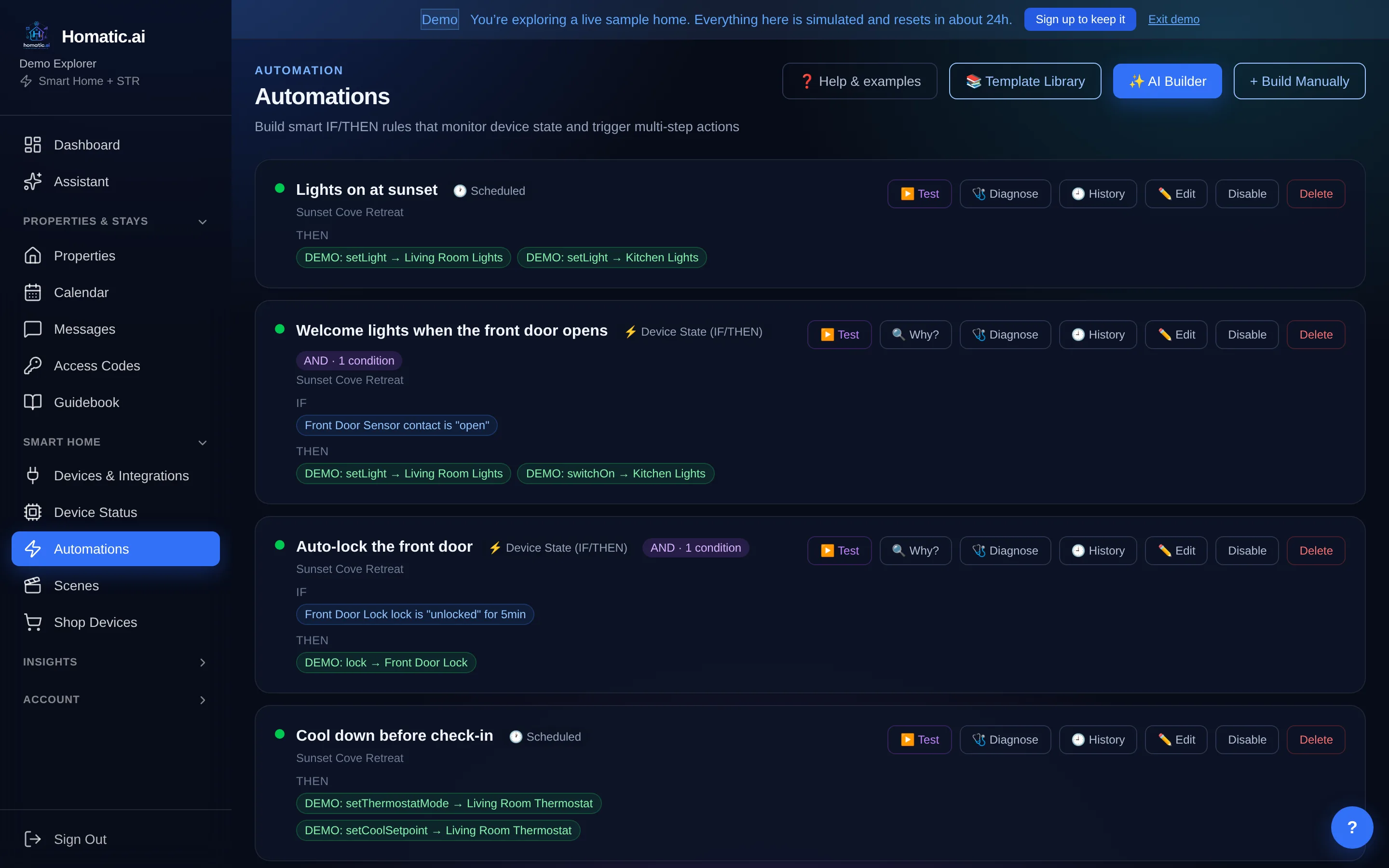
“Thirty minutes before check-in, set the thermostat to 72 and turn on the entry lights.” Homatic reads the devices that property actually has, produces a draft, and shows you every step before anything is saved.
There is more on the builder, on how rooms and areas work, and on reading a run log when a rule does not fire, in short-term rental smart home automation.
The part that matters is what happens when a step cannot be performed. A device type says an action exists; the vendor decides whether it is implemented, and those disagree more often than anyone expects — only some thermostat platforms implement eco mode, and only some implement fan control. A builder that skips that check produces a rule which reads correctly in the list, saves cleanly, and dies at run time. Homatic drops the unsupported step and tells you, rather than storing a rule that cannot work.
What happens when something fails
This is the section most automation marketing skips, and it is the one that decides whether automation is an improvement or a new way to be surprised.
- A device that cannot be read is excluded, not counted false. Counting it false let one offline sensor veto a whole rule indefinitely with nothing reporting why — because “I could not read this” and “this does not match” were the same value. A rule where nothing is readable never fires.
- A vendor cloud that answers is not proof the device is up. A hub will happily report on a switch that left the mesh days ago, so a reading the vendor itself marks unreachable is treated as unreadable rather than current.
- A retry is bounded and ends in a message. “Keep trying to lock the door” without a cap retries forever and tells nobody. Set an attempt cap and mark the actions that should run when it is spent.
- A pending command is never reported as success. Locks and codes settle asynchronously; treating “accepted” as “done” is what tells a door watchdog the bolt moved when it did not.
- A jammed deadbolt is not “unlocked”. Jammed is its own state, and it means the door is not secured and someone has to go and look.
Smoke and CO rules can only notify
An automation triggered by a smoke or CO reading may send notifications and nothing else — it can never unlock a door or actuate a device. That is enforced when you save it, when the AI drafts it, and again at run time, so a rule created before the guardrail existed is neutralized too.
Homatic is explicitly not a life-safety or emergency system. Use certified alarms and monitored equipment for that.
Across more than one property
A rule written on Unit 3 is almost always a decision about how you run all of them. Homatic applies it across the portfolio by matching each property’s own devices to the rule, and reports per property whether it is ready, needs a choice between two candidate thermostats, or is missing a device — rather than silently skipping the ones that do not fit. “Unit 4 has no water sensor” is the most useful sentence that process produces, and hiding it is how you end up believing a rule is live everywhere.
Operating 20+ properties → · For property managers →
What it connects to
Booking calendars. Airbnb, Vrbo and Booking.com work through iCal immediately. Direct connections cover Hostaway, Guesty, Lodgify and OwnerRez, which pull reservations with guest details and rates where the vendor exposes them.
Devices. Around 40 smart-home integrations, including SmartThings, Google Nest, ecobee, Honeywell, Schlage, August, Yale, Kwikset, RemoteLock, Igloohome, Ring, Philips Hue, Flume, Moen Flo, Phyn, Sense, Emporia Vue, Minut and Home Assistant.
Devices group by where they are, not whose app they came from — so a thermostat from one brand and a sensor from another in the same bedroom appear together, rather than under two vendor menus.
Why this is different from a hub or a PMS
A PMS knows who is coming and when. A smart-home hub knows what each device is doing. Neither knows what the property should do because of the reservation, and that gap is where the turnover work lives. The full comparison →
Homatic is an early-stage product and does not claim otherwise. What it offers instead of a customer list is specificity: the exact integrations, what each one can and cannot do, what happens when a vendor call fails, an audit trail of every physical action, and a 30-day trial that needs no card.
Common questions
What is Airbnb smart home automation?
Connecting your booking calendar to the devices in the property, so that a reservation — not a fixed schedule — is what changes the door code, the thermostat and the lights. A timer runs at 3pm whether or not anyone is arriving. A booking-driven rule runs because someone is.
Do I need new hardware?
Usually not. Homatic connects to accounts you already have with around 40 smart-home vendors, including SmartThings, Nest, ecobee, Schlage, August, Yale, Ring and Hue. A property with a smart lock and a smart thermostat already has enough to automate check-in and checkout.
Does it work with Vrbo and Booking.com as well as Airbnb?
Yes. Airbnb, Vrbo and Booking.com all work, as do Guesty, Lodgify, OwnerRez and Hostaway. Any calendar that publishes an iCal feed works immediately, with no partner integration needed.
What happens if a device is offline when a rule should run?
A device Homatic cannot read is excluded from the decision rather than counted as false, so one dark sensor neither silently vetoes a rule nor silently satisfies one. A rule that makes a claim about every device — "if all windows are closed, arm the alarm" — can be set to require that every device is readable before it acts.
Is this a security or life-safety system?
No. Homatic is explicitly not a life-safety or emergency system. A rule triggered by smoke or CO can only send notifications; it is blocked from operating a device at save time, in the AI builder, and again at run time.
See Homatic on your own properties
Connect a property and the dashboard fills in from your real devices — your locks, your thermostat, your calendar. Free for 30 days on Starter, no card required.