 Homatic.ai
AI Assistant
The Homatic AI Assistant: what you can ask it, and what it can do
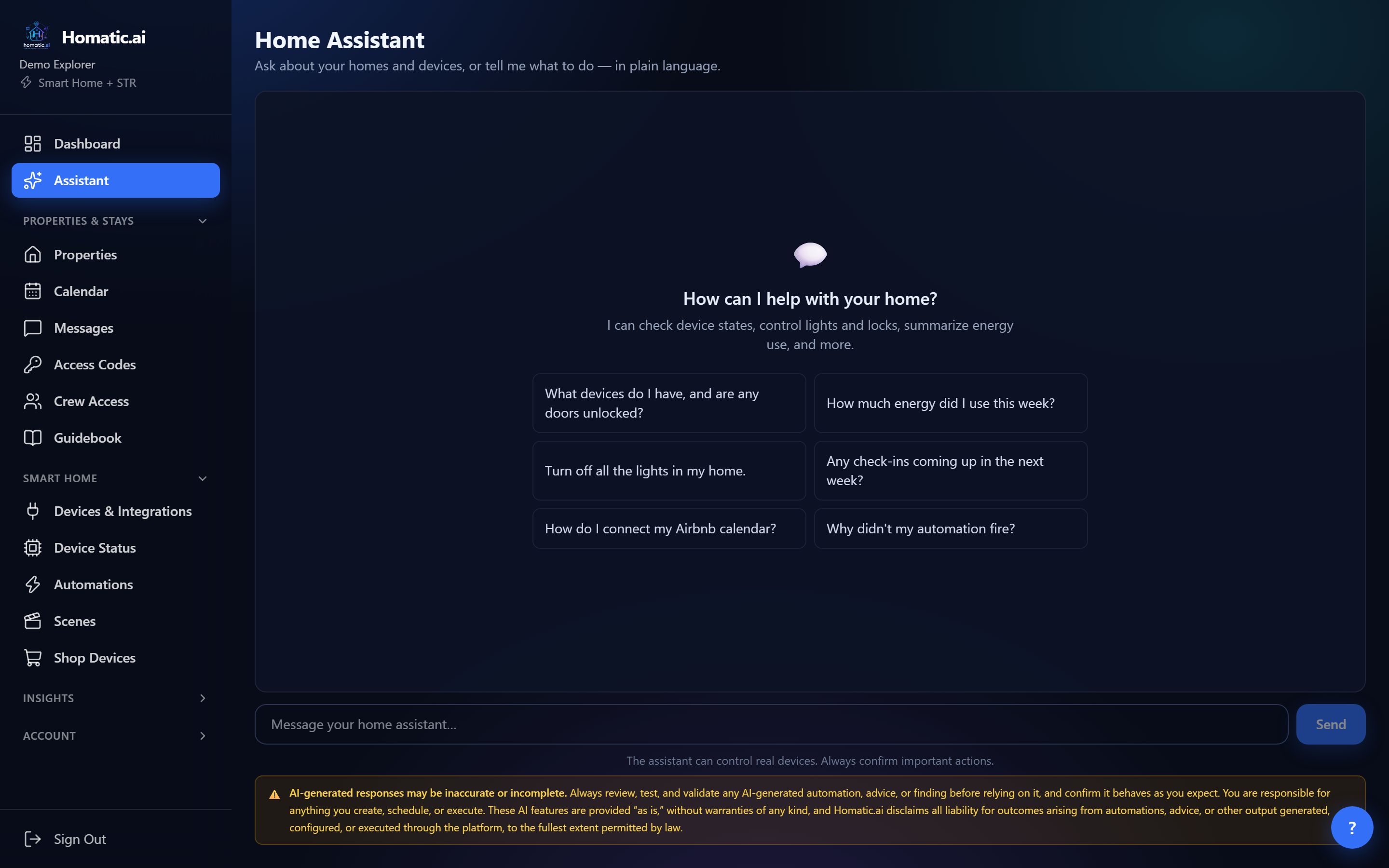
The Assistant is a chat that knows your homes. Ask it what is going on (which doors are unlocked, how long the AC ran, who is checking in on Friday) or tell it what to do (turn off the lights, set the bedroom to 70). It answers from your real devices, bookings and history, in plain language.
Start free — no credit card See example questions
Getting started
Choose Assistant at the top of the sidebar, type a question and press Send. Answers stream in as they are written. New chat starts a fresh conversation. Temperatures come back in the unit you chose in your settings, and times are given in each property’s own time zone.
What you can ask
What is happening right now
- “What devices do I have, and are any doors unlocked?”
- “Is the back door closed at the lake house?”
- “What is the thermostat set to in the living room?”
- “Are any of my devices offline?”
What happened, and for how long
- “How long did the AC run yesterday?”
- “When was the front door last unlocked, and how many times this week?”
- “Was the Nest thermostat offline this week? For how long?”
- “Did the leak sensor go wet at any point in the last two weeks?”
Energy and usage
- “How much energy did I use this week?”
- “Is water use higher than usual this month?”
Bookings and stays
- “Any check-ins coming up in the next week?”
- “What time is check-in at the cottage?”
- “Did anything happen during the last stay: noise, a leak, a jammed lock?”
Your automations
- “What automations do I have at the beach house?”
- “When did the checkout rule last run?”
How to use Homatic
- “How do I connect my Airbnb calendar?”
- “Where do I give my cleaner a door code?”
Ask about your own home → Connect a property and the Assistant answers from your real devices and bookings.
What you can tell it to do
- “Turn off all the lights in my home.”
- “Turn off everything in the guest bedroom.” (room-wide on/off)
- “Set the upstairs thermostat to 70 and switch it to cool.”
- “Run the fan for 30 minutes.”
- “Dim the kitchen lights to 40% and make them warm white.”
- “Lock the front door.”
When a command reaches only some of the devices it asks for, the Assistant tells you which ones did not respond rather than reporting success.
What it will not do, on purpose
- No unlocking, opening or disarming. For safety, the Assistant does not unlock doors, open garage doors or gates, or disarm alarms. Use the button on the device card in Device Status for those.
- Sensible temperatures only. A setpoint outside 45–95°F is refused and the Assistant asks you to confirm, rather than quietly changing the number.
- Only your properties. It sees only the properties you own or have been given access to. Guest details are masked for team members whose role hides them.
- Honest about gaps. If a device was not reporting, it says “last heard from” rather than claiming nothing happened.
- Building automations happens on the Automations page, where the AI builder shows you every step before anything is saved.
Which plans include it
The Assistant is included on every paid plan and during the 30-day free trial. AI use draws on a monthly allowance that grows with the plan.
Common questions
Can the AI Assistant unlock my door?
No. For safety it does not unlock doors, open garage doors or gates, or disarm alarms; use the device card in Device Status for those. It can lock doors, switch lights and set thermostats.
Does it know about my bookings?
Yes. It can list upcoming check-ins, tell you check-in times, and report what happened during a stay, such as noise, a leak or a jammed lock.
Which plans include it?
Every paid plan and the 30-day free trial, within a monthly AI allowance that grows with the plan.
See Homatic on your own properties
Connect a property and the dashboard fills in from your real devices — your locks, your thermostat, your calendar. Free for 30 days on Starter, no card required.