 Homatic.ai
Booking calendars
How to import your booking calendar into Homatic
Your bookings are what make Homatic run the house: door codes for each guest, the thermostat before arrival, the reset after checkout. Connecting a calendar takes a few minutes. Paste an iCal link from Airbnb, Vrbo or Booking.com, or connect a property manager such as Guesty, Hostaway, Lodgify or OwnerRez for fuller data.
Start free — no credit card Connect with an iCal link
Where to go
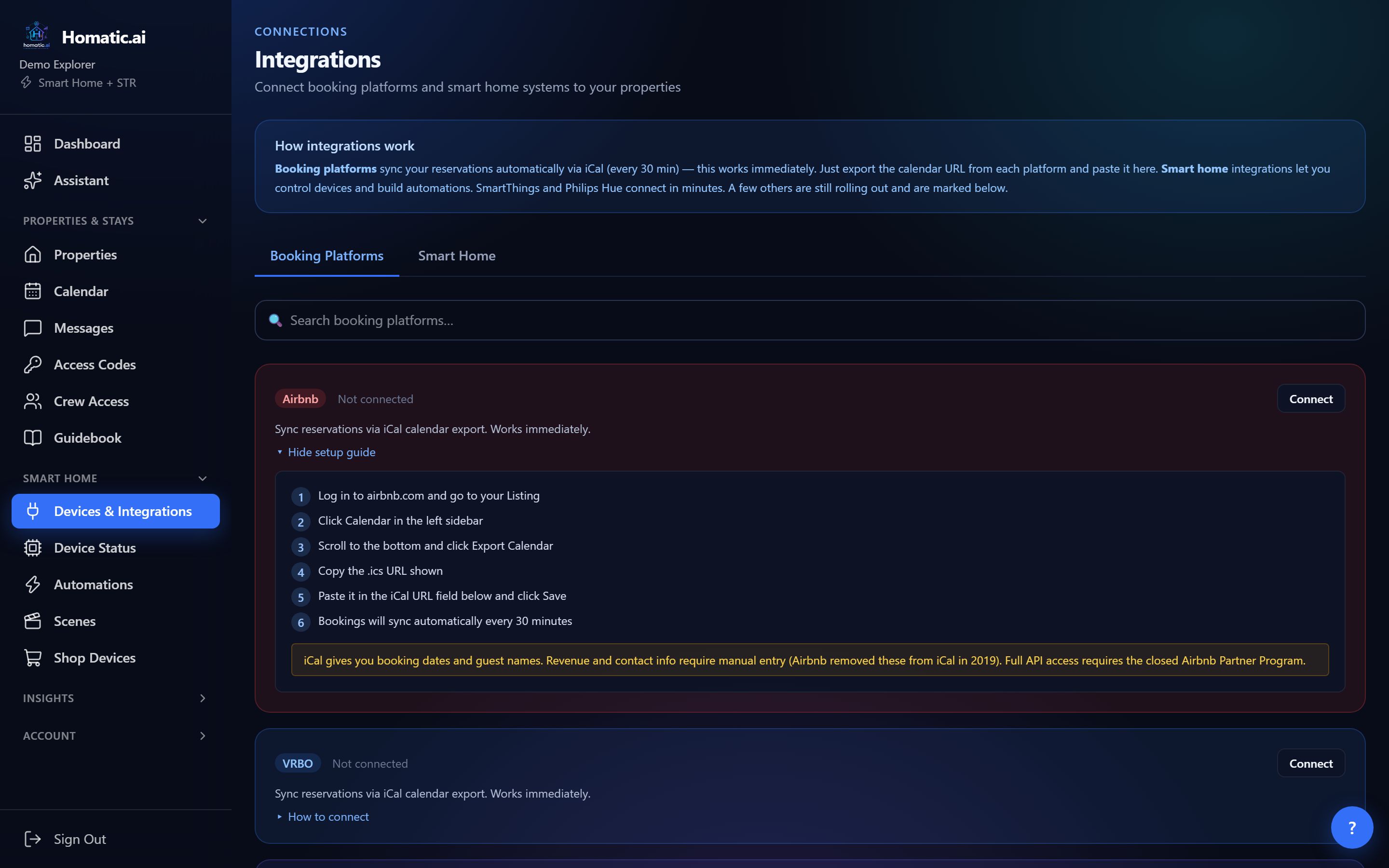
In the sidebar under Smart Home, open Devices & Integrations and choose the Booking Platforms tab. Each platform has a ▸ How to connect link with that site’s steps. A new account with no bookings also sees a Connect a booking site shortcut on the Calendar page.
Option 1: an iCal link (Airbnb, Vrbo, Booking.com)
Every major booking site publishes a calendar link (iCal, ending in .ics). It works immediately and needs no approval from anyone.
- 1Copy the link from the booking siteAirbnb: open the listing, then Calendar, scroll down and click Export Calendar, and copy the link. Vrbo: Calendar, then Import/Export, then Export Calendar. Booking.com: in the Extranet, Calendar, then Sync your calendar, then Export to external calendar.
- 2Paste it into HomaticOn the platform’s card, press Connect, choose the property, paste the link into iCal URL, and save.
- 3Check the calendarYour stays appear on the Calendar page. From then on Homatic checks the link every 30 minutes.
What an iCal link carries: the dates of each stay, the blocked nights, and on Airbnb the guest’s name. It does not carry revenue or guest contact details, because the booking sites leave them out of iCal. You can add revenue later with an import (below) or by editing a booking.
Cancellations: a booking site cancels a stay by leaving it out of the feed. When an upcoming stay disappears from your link, Homatic marks it cancelled, and its guest door code is taken off the lock. If a feed comes back completely empty while several stays are booked, Homatic treats it as a glitch at the booking site and leaves your stays alone.
Connect your calendar → Paste one link and your next stays appear on the calendar.
Option 2: connect your property manager (PMS)
If you run your rentals through a property management system, connecting it brings in the full reservation, including guest contact details and revenue where that system provides them.
| Platform | What you enter | Where to find it |
|---|---|---|
| Guesty | Client ID and Client Secret | Guesty → Integrations → API & Webhooks → Create Application (needs Admin access; the secret is shown only once) |
| Hostaway | Account ID and API key | Hostaway → Settings → Hostaway API. An optional webhook makes updates near-instant |
| Lodgify | API key | Lodgify → Settings → Public API |
| OwnerRez | Nothing to copy | Click Connect and approve access in OwnerRez |
For accounts covering several listings, the card then asks which listing this property mirrors. Nothing syncs until you choose. Cancellations made in these systems are reflected on your Homatic calendar.
Option 3: import past bookings and revenue
Import Revenue brings in history from a spreadsheet export: a single CSV, or a ZIP of several (for example one file per year). It reads exports from Airbnb (Transaction History → Export to CSV), Vrbo and Guesty, matches rows to existing stays by confirmation code, or by dates when there is no code, and reports how many stays were created, updated, cancelled or skipped. A matched stay is updated from the file (guest name, party size, dates, revenue and status), so the export wins over hand edits to those fields. Name ZIP files so the platform is obvious, such as airbnb_2025.csv. Limits: 10 MB per upload, up to 100,000 rows per file.
On the calendar
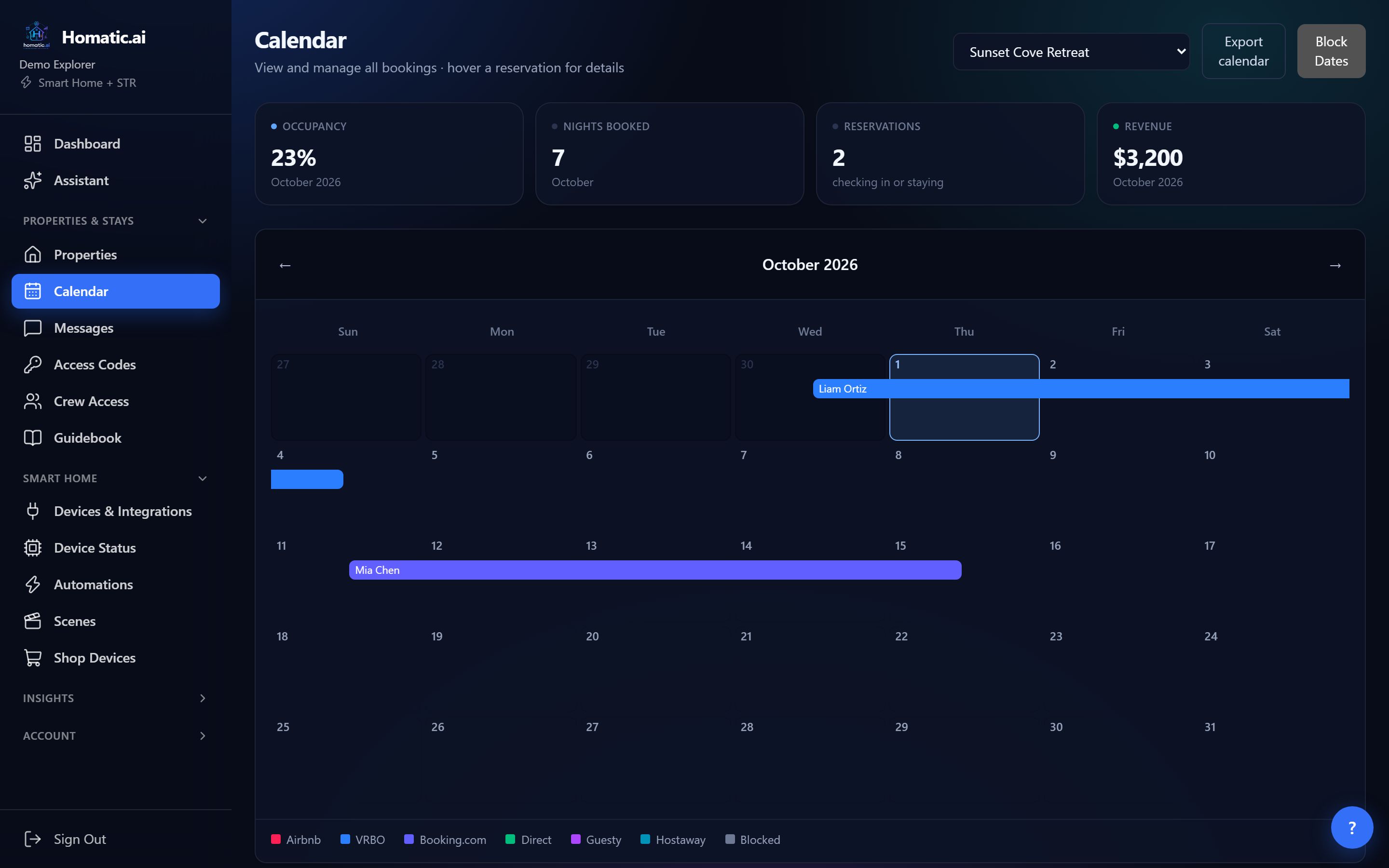
- Blocked nights from your booking site show in grey. You can block dates yourself with Block Dates.
- Reservations from a booking site are changed or cancelled on that site, not in Homatic, so both stay in step.
- Sync now on a connected card runs a full refresh immediately and shows what it did (for example “Synced 12 of 12 reservations; 1 cancelled on the platform”), or why it could not run.
- Occupancy and revenue totals leave out blocked nights and cancelled stays.
Which plans include it
Booking sync is on every paid plan, including the $19 Homeowner plan for one property, and during the 30-day free trial.
Common questions
How often does Homatic check my calendar?
Every 30 minutes for an iCal link, and Sync now on the connected card refreshes it immediately. OwnerRez updates as changes happen.
Does iCal bring in revenue and guest phone numbers?
No. Booking sites leave revenue and contact details out of iCal; Airbnb includes the guest name. Connect a property manager such as Guesty for full reservation data, or add revenue with Import Revenue.
Which plans include booking sync?
Every paid plan, including the $19 Homeowner plan for one property, and the 30-day free trial.
See Homatic on your own properties
Connect a property and the dashboard fills in from your real devices — your locks, your thermostat, your calendar. Free for 30 days on Starter, no card required.